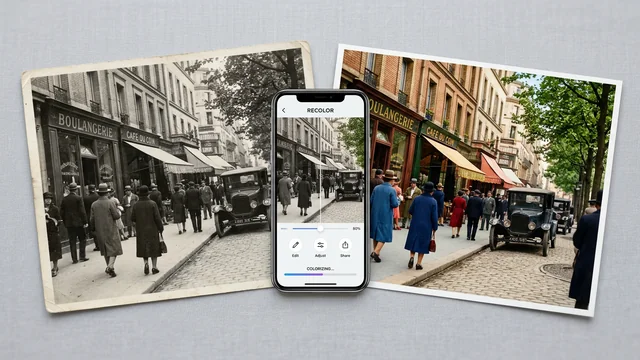
Best Photo Colorization Apps in 2026: AI Tools for Black & White Photos
"I want to change the colors in a photo" can mean three very different things: colorizing an old black-and-white photograph, changing a specific color in an existing photo (hair, clothing, background), or restoring the faded colors of an aged print. Each requires different tools, and most articles lump them together. This guide separates them clearly.
🇯🇵 この記事の日本語版はこちら(Japanese version)
Contents
Three Different Use Cases for "Photo Color Change"
Use Case 1: Colorizing Black-and-White Photos (AI Auto-Colorization)
You have a grayscale photograph — a family portrait from the 1950s, a historical image, an old film scan — and you want to see it in color. AI models trained on millions of color images analyze the content and assign plausible colors automatically. The result is an estimate, not a restoration of the original colors.
Use Case 2: Changing Specific Colors in an Existing Photo
You want to change the color of a specific element — a model's hair from brown to blonde, a product from red to blue, a wall from white to gray — without affecting the rest of the image. This requires selective editing tools, not AI colorization.
Use Case 3: Restoring Faded Colors in Old Photos
You have a color photograph that has yellowed, faded, or shifted over decades. The colors were there once but have degraded. AI restoration tools attempt to reverse this degradation and bring back natural-looking colors.
Tool Comparison by Use Case
| Tool | B&W Colorization | Selective Color Change | Faded Photo Restoration | Free Tier | Platform |
|---|---|---|---|---|---|
| Palette.fm | Yes | No | No | Limited (check site) | Web browser |
| VanceAI | Yes | No | Yes | 10-credit free trial | Web browser |
| PhotoDirector | Yes | Yes | No | Free version available | iOS, Android, Desktop |
| Colorize | Yes | No | No | Limited free | iOS, Android |
| Snapseed | No | Yes | No | Completely free | iOS, Android |
| Fotor | Yes | Yes (limited) | No | Limited free | Web, iOS, Android |
Tool Profiles
Palette.fm (Web)
A browser-based AI colorization tool. Upload a black-and-white image and the AI generates a colorized version automatically. Palette.fm offers multiple color palette options for the same image, letting you choose the most natural-looking result. No account required for basic use, though the free tier has limits that change over time — check their site for current availability. Processing happens server-side, so your image is uploaded.
VanceAI (Web)
A web-based suite of AI image tools that includes colorization and photo restoration. The colorization feature works similarly to Palette.fm. The restoration feature specifically targets aged photos — it attempts to correct yellowing, fading, and color shifts. It offers a 10-credit free trial. Paid credits are required for regular use (the smallest pay-as-you-go pack is 200 credits at 30 yen per credit).
PhotoDirector (Mobile + Desktop)
A full-featured photo editor from CyberLink that includes AI colorization among many other tools. The free version includes the colorization feature, making it one of the most accessible options for mobile users. Also includes selective color adjustment tools for changing specific colors in existing photos.
Colorize (iOS/Android)
A dedicated mobile app focused specifically on AI colorization of black-and-white photos. The focused interface makes it the simplest option for users who only need colorization. Limited free processing; subscription required for regular use.
Snapseed (iOS/Android)
Google's free mobile photo editor does not do AI colorization, but its selective adjustment brush is the best free tool for changing specific colors in a photo. Select an area by brushing over it, then adjust hue, saturation, and brightness independently. Useful for changing hair color, clothing color, or background color without affecting the rest of the image.
Fotor (Web/Mobile)
A general-purpose online photo editor that includes AI colorization. Also offers basic selective color adjustment tools. The free tier has limitations on output resolution and daily usage.
How AI Colorization Works (and Its Limits)
AI colorization models are trained on large datasets of color images that have been converted to grayscale. The model learns associations: sky tends to be blue, grass tends to be green, skin has specific tone ranges. When given a new grayscale image, it applies these learned associations to predict plausible colors.
The key word is "plausible," not "accurate." The AI cannot know the actual color of a dress in a 1940s photograph — it guesses based on patterns. Common limitations include: military uniforms may be assigned the wrong color for the era or country. Unusual items (a red bicycle, a yellow house) may be colored in more "expected" tones. Skin tones can be inconsistent, especially for subjects the model has less training data for.
For best results, try multiple tools on the same image and compare. Palette.fm's multiple palette options are useful here — different palettes can produce surprisingly different and sometimes more accurate results.
When Apps Are Not Enough
AI tools work well for casual use — sharing colorized family photos, social media posts, quick visualizations. They are not reliable enough for professional archival work, museum exhibitions, or any context where color accuracy matters. For irreplaceable family photographs or historically significant images, professional photo restoration services produce more reliable results through manual work combined with historical research.
The same applies to selective color changes: if you need to create product color variations for an e-commerce catalog (showing the same shirt in 5 colors), Photoshop's adjustment layers give precise control that mobile apps cannot match. For a quick preview of how something would look in a different color, Snapseed is fine; for production assets, use desktop software.
FAQ
Q. Can I colorize black-and-white photos for free?
A. Yes, with limits. VanceAI offers a 10-credit free trial. PhotoDirector's free version includes AI colorization. Palette.fm is browser-based and offers a limited free tier (approximately 1 image per month, check their site for current limits). For bulk processing, a paid plan is necessary.
Q. Can I colorize photos on my phone?
A. Yes. Colorize (iOS/Android) is a dedicated mobile app for AI colorization. PhotoDirector also has a mobile version with colorization features. Palette.fm and VanceAI work in your phone's browser without installing anything.
Q. How accurate are AI-colorized photos?
A. AI colorization produces plausible colors, not necessarily accurate ones. The AI guesses colors based on patterns learned from millions of images — it knows that sky is usually blue and grass is usually green, but it cannot know the exact color of a person's shirt from a grayscale image. Results vary by tool and image. For historical accuracy, compare results across multiple tools and verify against known references.
Q. Can I change just one color in a photo without affecting the rest?
A. Yes. Snapseed's selective adjustment brush lets you change the color of specific areas — hair, clothing, backgrounds — without affecting the rest of the image. For more precise control, desktop software like Lightroom's HSL sliders or Photoshop's Hue/Saturation adjustment layer can target specific color ranges.
Q. Can faded old photos be restored to their original colors?
A. AI tools like VanceAI's photo restoration feature can improve faded photos, but they restore to estimated colors, not the exact originals. The AI does not know what the original colors were — it infers what looks natural. For irreplaceable family photos, professional photo restoration services produce better and more reliable results.
よく読まれている記事